mirror of
https://github.com/HDT3213/delayqueue.git
synced 2025-12-24 10:30:52 +08:00

301 lines
9.1 KiB
Markdown
301 lines
9.1 KiB
Markdown
# DelayQueue
|
|
|
|

|
|
[](https://app.travis-ci.com/github/HDT3213/delayqueue)
|
|
[](https://coveralls.io/github/HDT3213/delayqueue?branch=master)
|
|
[](https://goreportcard.com/report/github.com/HDT3213/delayqueue)
|
|
[](https://pkg.go.dev/github.com/hdt3213/delayqueue)
|
|
|
|
[中文版](https://github.com/HDT3213/delayqueue/blob/master/README_CN.md)
|
|
|
|
DelayQueue is a message queue supporting delayed/scheduled delivery based on redis. It is designed to be reliable, scalable and easy to get started.
|
|
|
|
Core Advantages:
|
|
|
|
- Guaranteed at least once consumption
|
|
- Auto retry failed messages
|
|
- Works out of the box, Config Nothing and Deploy Nothing, A Redis is all you need.
|
|
- Natively adapted to the distributed environment, messages processed concurrently on multiple machines
|
|
. Workers can be added, removed or migrated at any time
|
|
- Support Redis Cluster or clusters of most cloud service providers. see chapter [Cluster](./README.md#Cluster)
|
|
- Easy to use monitoring data exporter, see [Monitoring](./README.md#Monitoring)
|
|
|
|
## Install
|
|
|
|
DelayQueue requires a Go version with modules support. Run following command line in your project with go.mod:
|
|
|
|
```
|
|
go get github.com/hdt3213/delayqueue
|
|
```
|
|
|
|
## Get Started
|
|
|
|
```go
|
|
package main
|
|
|
|
import (
|
|
"github.com/redis/go-redis/v9"
|
|
"github.com/hdt3213/delayqueue"
|
|
"strconv"
|
|
"time"
|
|
)
|
|
|
|
func main() {
|
|
redisCli := redis.NewClient(&redis.Options{
|
|
Addr: "127.0.0.1:6379",
|
|
})
|
|
queue := delayqueue.NewQueue("example", redisCli, func(payload string) bool {
|
|
// callback returns true to confirm successful consumption.
|
|
// If callback returns false or not return within maxConsumeDuration, DelayQueue will re-deliver this message
|
|
return true
|
|
}).WithConcurrent(4) // set the number of concurrent consumers
|
|
// send delay message
|
|
for i := 0; i < 10; i++ {
|
|
err := queue.SendDelayMsg(strconv.Itoa(i), time.Hour, delayqueue.WithRetryCount(3))
|
|
if err != nil {
|
|
panic(err)
|
|
}
|
|
}
|
|
// send schedule message
|
|
for i := 0; i < 10; i++ {
|
|
err := queue.SendScheduleMsg(strconv.Itoa(i), time.Now().Add(time.Hour))
|
|
if err != nil {
|
|
panic(err)
|
|
}
|
|
}
|
|
// start consume
|
|
done := queue.StartConsume()
|
|
<-done
|
|
}
|
|
```
|
|
|
|
> if you are using github.com/go-redis/redis/v8 please use `go get github.com/hdt3213/delayqueue@v8`
|
|
> If you are using redis client other than go-redis, you could wrap your redis client into [RedisCli](https://pkg.go.dev/github.com/hdt3213/delayqueue#RedisCli) interface
|
|
|
|
## Producer consumer distributed deployment
|
|
|
|
By default, delayqueue instances can be both producers and consumers.
|
|
|
|
If your program only need producers and consumers are placed elsewhere, `delayqueue.NewProducer` is a good option for you.
|
|
|
|
```go
|
|
func consumer() {
|
|
queue := NewQueue("test", redisCli, cb)
|
|
queue.StartConsume()
|
|
}
|
|
|
|
func producer() {
|
|
publisher := NewPublisher("test", redisCli)
|
|
publisher.SendDelayMsg(strconv.Itoa(i), 0)
|
|
}
|
|
```
|
|
|
|
## Options
|
|
|
|
```go
|
|
WithLogger(logger *log.Logger)
|
|
```
|
|
|
|
WithLogger customizes logger for queue
|
|
|
|
|
|
```go
|
|
WithConcurrent(c uint)
|
|
```
|
|
|
|
WithConcurrent sets the number of concurrent consumers
|
|
|
|
```go
|
|
WithFetchInterval(d time.Duration)
|
|
```
|
|
|
|
WithFetchInterval customizes the interval at which consumer fetch message from redis
|
|
|
|
```go
|
|
WithMaxConsumeDuration(d time.Duration)
|
|
```
|
|
|
|
WithMaxConsumeDuration customizes max consume duration
|
|
|
|
If no acknowledge received within WithMaxConsumeDuration after message delivery, DelayQueue will try to deliver this
|
|
message again
|
|
|
|
```go
|
|
WithFetchLimit(limit uint)
|
|
```
|
|
|
|
WithFetchLimit limits the max number of unack (processing) messages
|
|
|
|
```go
|
|
UseHashTagKey()
|
|
```
|
|
|
|
UseHashTagKey add hashtags to redis keys to ensure all keys of this queue are allocated in the same hash slot.
|
|
|
|
If you are using Codis/AliyunRedisCluster/TencentCloudRedisCluster, you should add this option to NewQueue: `NewQueue("test", redisCli, cb, UseHashTagKey())`. This Option cannot be changed after DelayQueue has been created.
|
|
|
|
WARNING! CHANGING(add or remove) this option will cause DelayQueue failing to read existed data in redis
|
|
|
|
> see more: https://redis.io/docs/reference/cluster-spec/#hash-tags
|
|
|
|
```go
|
|
WithDefaultRetryCount(count uint)
|
|
```
|
|
|
|
WithDefaultRetryCount customizes the max number of retry, it effects of messages in this queue
|
|
|
|
use WithRetryCount during DelayQueue.SendScheduleMsg or DelayQueue.SendDelayMsg to specific retry count of particular message
|
|
|
|
## Monitoring
|
|
|
|
We provides Monitor to monitor the running status.
|
|
|
|
```go
|
|
monitor := delayqueue.NewMonitor("example", redisCli)
|
|
```
|
|
|
|
Monitor.ListenEvent can register a listener that can receive all internal events, so you can use it to implement customized data reporting and metrics.
|
|
|
|
The monitor can receive events from all workers, even if they are running on another server.
|
|
|
|
```go
|
|
type EventListener interface {
|
|
OnEvent(*Event)
|
|
}
|
|
|
|
// returns: close function, error
|
|
func (m *Monitor) ListenEvent(listener EventListener) (func(), error)
|
|
```
|
|
|
|
The definition of event could be found in [events.go](./events.go).
|
|
|
|
Besides, We provide a demo that uses EventListener to monitor the production and consumption amount per minute.
|
|
|
|
The complete demo code can be found in [example/monitor](./example/monitor/main.go).
|
|
|
|
```go
|
|
type MyProfiler struct {
|
|
List []*Metrics
|
|
Start int64
|
|
}
|
|
|
|
func (p *MyProfiler) OnEvent(event *delayqueue.Event) {
|
|
sinceUptime := event.Timestamp - p.Start
|
|
upMinutes := sinceUptime / 60
|
|
if len(p.List) <= int(upMinutes) {
|
|
p.List = append(p.List, &Metrics{})
|
|
}
|
|
current := p.List[upMinutes]
|
|
switch event.Code {
|
|
case delayqueue.NewMessageEvent:
|
|
current.ProduceCount += event.MsgCount
|
|
case delayqueue.DeliveredEvent:
|
|
current.DeliverCount += event.MsgCount
|
|
case delayqueue.AckEvent:
|
|
current.ConsumeCount += event.MsgCount
|
|
case delayqueue.RetryEvent:
|
|
current.RetryCount += event.MsgCount
|
|
case delayqueue.FinalFailedEvent:
|
|
current.FailCount += event.MsgCount
|
|
}
|
|
}
|
|
|
|
func main() {
|
|
queue := delayqueue.NewQueue("example", redisCli, func(payload string) bool {
|
|
return true
|
|
})
|
|
start := time.Now()
|
|
// IMPORTANT: EnableReport must be called so monitor can do its work
|
|
queue.EnableReport()
|
|
|
|
// setup monitor
|
|
monitor := delayqueue.NewMonitor("example", redisCli)
|
|
listener := &MyProfiler{
|
|
Start: start.Unix(),
|
|
}
|
|
monitor.ListenEvent(listener)
|
|
|
|
// print metrics every minute
|
|
tick := time.Tick(time.Minute)
|
|
go func() {
|
|
for range tick {
|
|
minutes := len(listener.List)-1
|
|
fmt.Printf("%d: %#v", minutes, listener.List[minutes])
|
|
}
|
|
}()
|
|
}
|
|
```
|
|
|
|
Monitor use redis pub/sub to collect data, so it is important to call `DelayQueue.EnableReport` of all workers, to enable events reporting for monitor.
|
|
|
|
If you do not want to use redis pub/sub, you can use `DelayQueue.ListenEvent` to collect data yourself.
|
|
|
|
Please be advised, `DelayQueue.ListenEvent` can only receive events from the current instance, while monitor can receive events from all instances in the queue.
|
|
|
|
Once `DelayQueue.ListenEvent` is called, the monitor's listener will be overwritten unless EnableReport is called again to re-enable the monitor.
|
|
|
|
### Get Status
|
|
|
|
You could get Pending Count, Ready Count and Processing Count from the monitor:
|
|
|
|
```go
|
|
func (m *Monitor) GetPendingCount() (int64, error)
|
|
```
|
|
|
|
GetPendingCount returns the number of which delivery time has not arrived.
|
|
|
|
```go
|
|
func (m *Monitor) GetReadyCount() (int64, error)
|
|
```
|
|
|
|
GetReadyCount returns the number of messages which have arrived delivery time but but have not been delivered yet
|
|
|
|
```go
|
|
func (m *Monitor) GetProcessingCount() (int64, error)
|
|
```
|
|
|
|
GetProcessingCount returns the number of messages which are being processed
|
|
|
|
|
|
## Cluster
|
|
|
|
If you are using Redis Cluster, please use `NewQueueOnCluster`
|
|
|
|
```go
|
|
redisCli := redis.NewClusterClient(&redis.ClusterOptions{
|
|
Addrs: []string{
|
|
"127.0.0.1:7000",
|
|
"127.0.0.1:7001",
|
|
"127.0.0.1:7002",
|
|
},
|
|
})
|
|
callback := func(s string) bool {
|
|
return true
|
|
}
|
|
queue := NewQueueOnCluster("test", redisCli, callback)
|
|
```
|
|
|
|
If you are using transparent clusters, such as codis, twemproxy, or the redis of cluster architecture on aliyun, tencentcloud,
|
|
just use `NewQueue` and enable hash tag
|
|
|
|
```go
|
|
redisCli := redis.NewClient(&redis.Options{
|
|
Addr: "127.0.0.1:6379",
|
|
})
|
|
callback := func(s string) bool {
|
|
return true
|
|
}
|
|
queue := delayqueue.NewQueue("example", redisCli, callback, UseHashTagKey())
|
|
```
|
|
|
|
## More Details
|
|
|
|
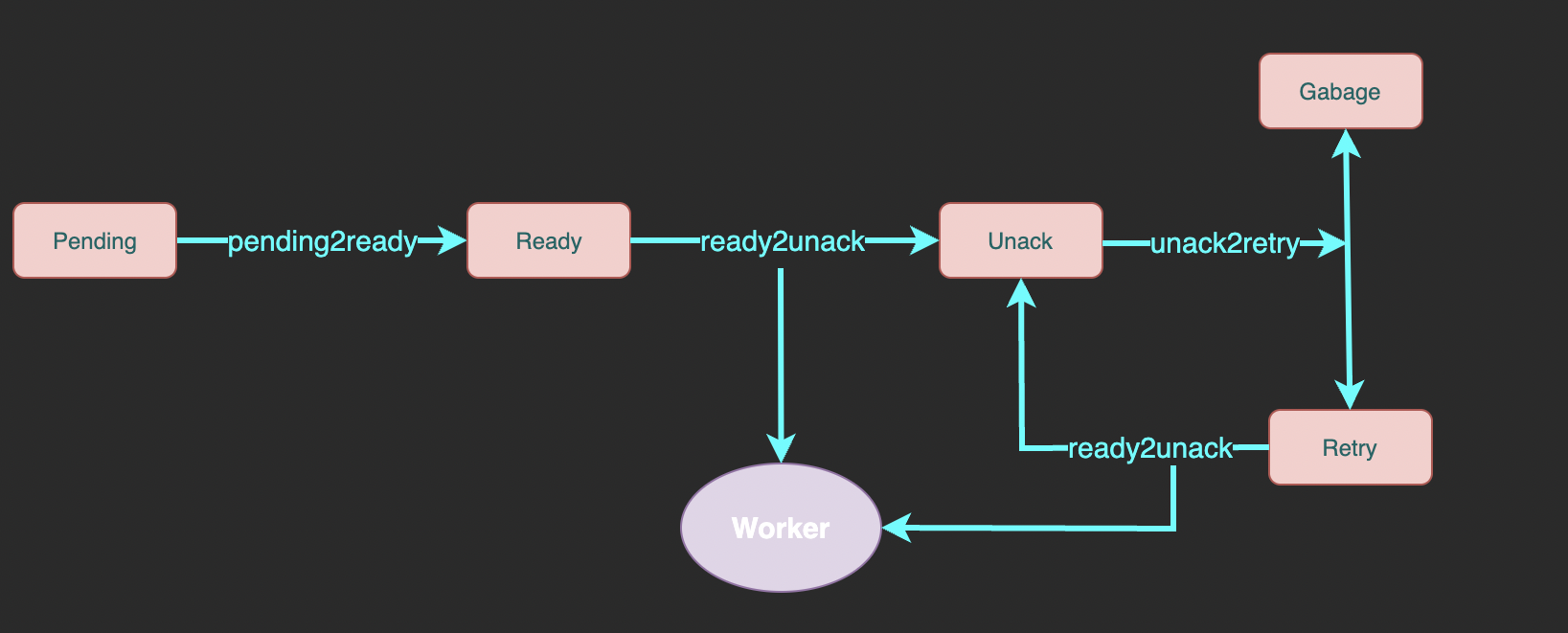
Here is the complete flowchart:
|
|
|
|
|
|
|
|
- pending: A sorted set of messages pending for delivery. `member` is message id, `score` is delivery unix timestamp.
|
|
- ready: A list of messages ready to deliver. Workers fetch messages from here.
|
|
- unack: A sorted set of messages waiting for ack (successfully consumed confirmation) which means the messages here is being processing. `member` is message id, `score` is the unix timestamp of processing deadline.
|
|
- retry: A list of messages which processing exceeded deadline and waits for retry
|
|
- garbage: A list of messages reaching max retry count and waits for cleaning |